Module

Quality

Quality-control module (QC, NCR/CAPA)

Quality control by the standard, not by eye: an ISO 2859-1 sampling plan for the lot size, process stability monitoring, lot dispositions — accept, reject, rework. The verdict is computed from the plan and actual measurements, so a borderline lot does not pass because someone was in a hurry. Defects group by cause and supplier — the supplier conversation starts from numbers. For manufacturing and anyone running incoming inspection.

Business outcome
Quality-control module (QC, NCR/CAPA)
Digital employee
Computes the sampling plan and derives the verdict from measurements
Human control
A borderline lot is always a human call
Verified product route
/quality/qc
Quality control
Under check
Supplier lotSample per plan
Accepted
Decision recordedWith its grounds
Quarantine
Defect repeatsThird time this month
A decision always carries its groundsA repeat is visible as a repeat
DIGITAL EMPLOYEES · LAUNCH

Digital employees run the work — AI is not a side panel

They read the same documents as your team, prepare the next action, surface exceptions and keep the decision trail inside the process.

You set the authority. Payments, goods receipts and shipments always wait for a person. Everything else, customer messages included, starts as a suggestion and runs on its own only once you allow it and verified results back it.
  1. DAY 1See the process working

    Choose an industry preset and start with realistic demo data; the team sees the target flow before migration.

  2. FIRST WEEKConnect real evidence

    Import or connect source data. Digital employees observe, draft and expose gaps while people confirm decisions.

  3. TARGET · 4 WEEKSMove the operating loop

    For a typical 50-person company, the target is four weeks. Source quality, integrations and legal requirements can change it.

Who does the work

The digital employees of this module

A module is more than screens. Digital employees work behind them: they prepare the decision and bring it to you instead of waiting for you to type everything in. Below — who exactly, what they do, and where their authority stops.

Quality inspector

Computes the sampling plan and derives the verdict from measurements

  • builds an ISO 2859-1 sampling plan for the lot size
  • computes process stability and catches drift before defects
  • groups defects by cause and supplier — for the conversation with them

A borderline lot is always a human call

WORK, NOT A FEATURE LIST

See what changes in the workflow — and where it lives in the product

Every capability below is tied to an implemented product route. A reviewed product screenshot is shown when it exists in this language; otherwise the route is explained as a transparent work loop, never as invented UI.

  1. 01

    Sampling inspection per ISO 2859-1

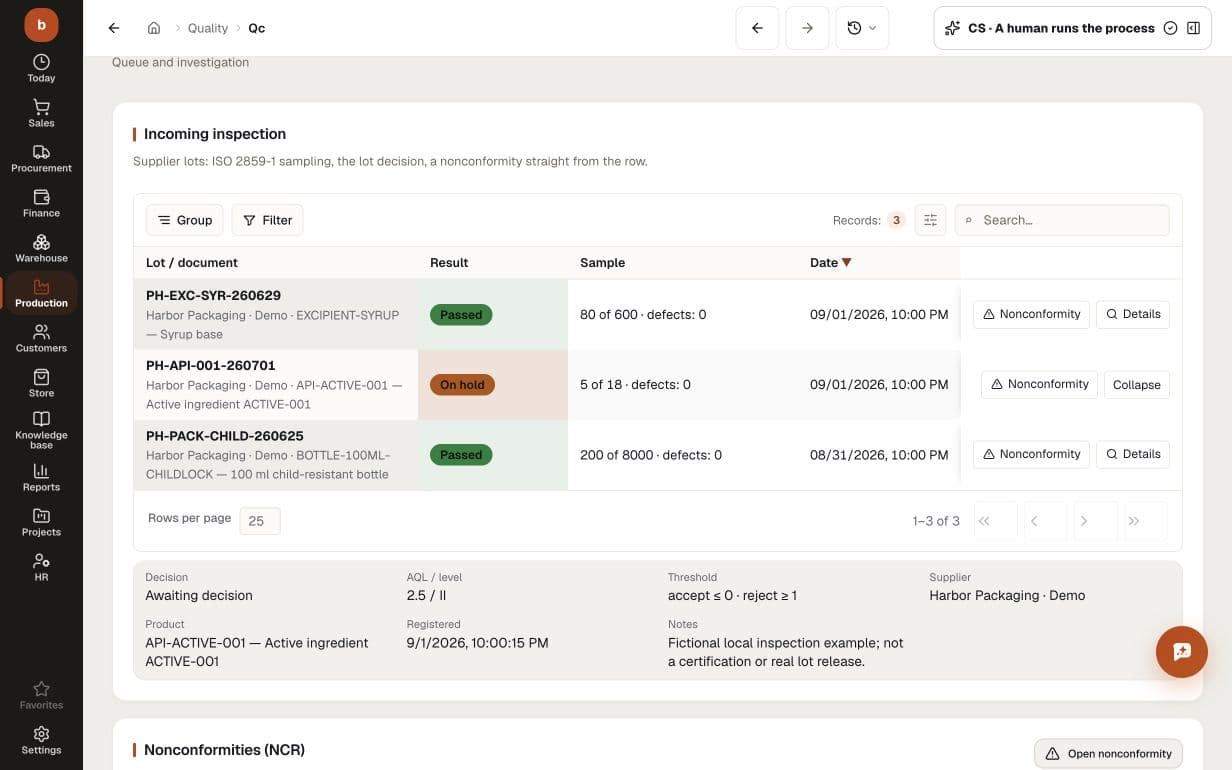
    The AQL sampling plan is computed to the standard: give the lot size, AQL level and inspection level, and the system returns the sample size and the accept/reject thresholds. The lot decision is recorded together with its grounds.

    PRODUCT SCREEN · DEMO DATA/quality/qc
    Demo incoming inspection: three supplier lots, an open five-unit sample from a lot of eighteen, acceptance thresholds and a pending lot decision
    Demo incoming inspection: three supplier lots, an open five-unit sample from a lot of eighteen, acceptance thresholds and a pending lot decision
  2. 02

    Lot disposition from data, not gut feel

    Accept, reject, rework — the verdict is computed from the sampling plan and actual measurements. A borderline lot does not pass because someone was in a hurry.

    PRODUCT SCREEN · DEMO DATA/quality/qc
    Demo incoming inspection: three supplier lots, an open five-unit sample from a lot of eighteen, acceptance thresholds and a pending lot decision
    Demo incoming inspection: three supplier lots, an open five-unit sample from a lot of eighteen, acceptance thresholds and a pending lot decision
  3. 03

    A quality board: defects by cause and supplier

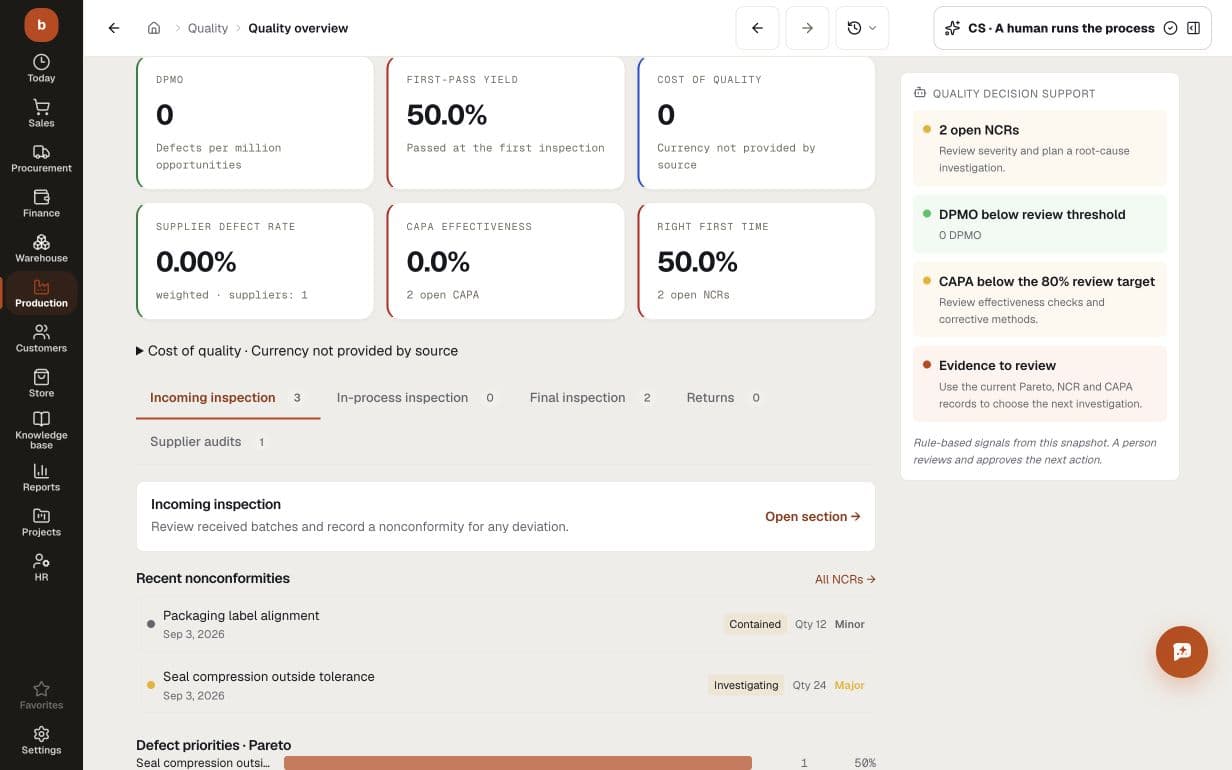
    Inspection yield, supplier defect rates, open NCRs and CAPA in one view. Move from the metrics to nonconformities, severity and affected quantities to choose the next investigation.

    PRODUCT SCREEN · DEMO DATA/quality/dashboard
    Fictional quality dashboard: 50% first-pass yield, two NCRs affecting 12 and 24 units, severity and containment status, two open CAPA; cost currency is not supplied by the source
    Fictional quality dashboard: 50% first-pass yield, two NCRs affecting 12 and 24 units, severity and containment status, two open CAPA; cost currency is not supplied by the source
  4. 04

    Process stability (SPC)

    Control limits and Western Electric rules: feed in a series of measurements and the system says whether the process is stable or already drifting. Alongside it, the quality dashboard: scrap share, recurring defects and the suppliers behind them.

    PRODUCT ROUTE/quality/dashboard
    01SignalProcess stability (SPC)
    02Digital employee preparesbuilds an ISO 2859-1 sampling plan for the lot size
    03Human decidesA borderline lot is always a human call
    Work map built from the implemented product route — not a stock image.
On screen

How it looks at work

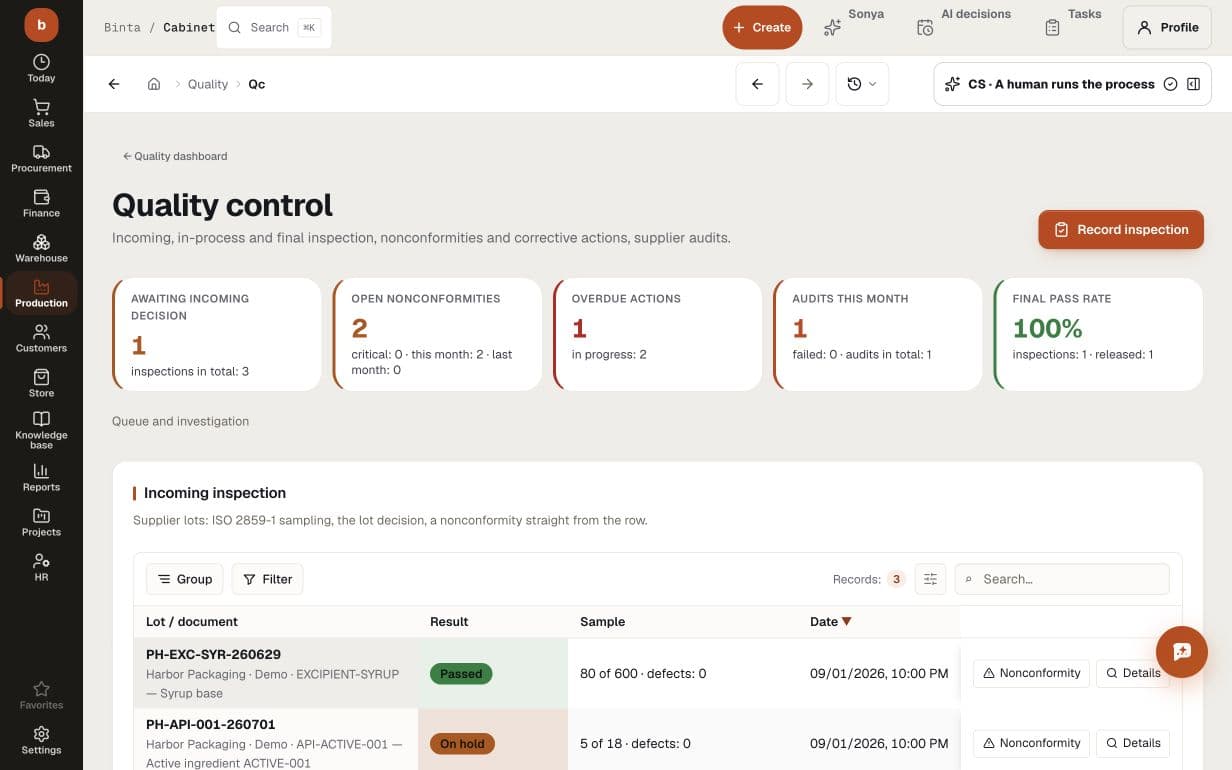
Demo quality queue: incoming sampling and lot decisions, two open nonconformities, one overdue corrective action and an unscored supplier audit
BUYER QUESTIONS

What teams usually need to know before they start

Can we start with Quality without replacing everything at once?

Yes. Start with one workflow and the data it needs. Add adjacent modules only when the operating process calls for them.

What does AI do inside Quality?

Digital employees watch product records, prepare the next action, surface exceptions and keep the decision trail. Their exact actions and authority gates are shown on this page.

Which decisions stay with people?

Your team sets the authority. Payments, goods receipts and shipments always wait for a person's confirmation, at any trust level. Everything else, customer messages and ledger entries included, stays on suggestion or approval until you deliberately allow it to run on its own.

How quickly can we see a working flow?

Start by exploring the process with labelled demo data. A live rollout needs checked source data, connected systems and agreed approval rules. We scope those prerequisites with your team before agreeing a schedule; creating a workspace is not a completed implementation.

START WITH ONE REAL PROCESS

Bring the workflow that costs your team the most attention

Map its data, decisions and approval gates first. Then see exactly what the module and its digital employees can take over — before you commit to a wider rollout.

Other modules