Module

Projects

Projects, tasks, project accounting

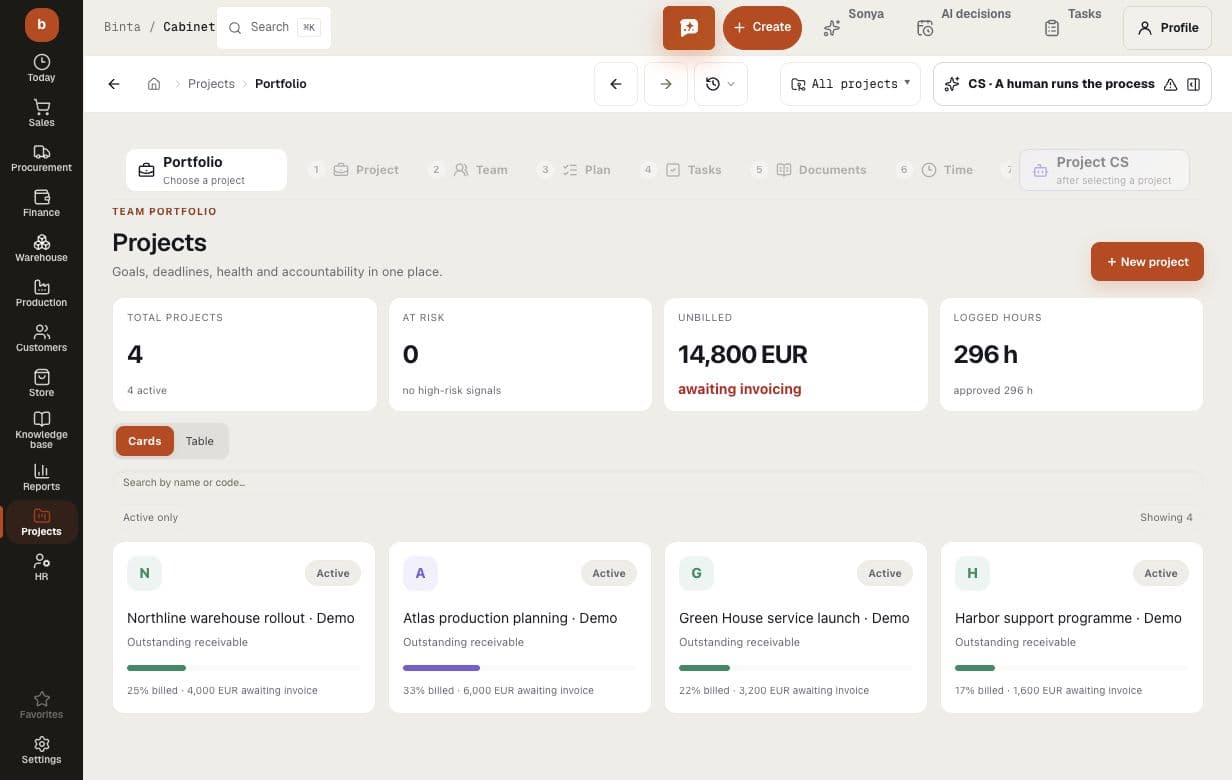
For businesses that sell work rather than goods: a project with stages and tasks, assignees and dependencies — moving a date recomputes the plan instead of silently breaking it. Customer orders, purchases and people's hours attach to the project, so margin is built from real documents, not a side spreadsheet. You see what is ready to bill, what is not accepted yet and which task holds the whole project. Turn it on for services and project work; trade without projects does not need it.

Business outcome
Projects, tasks, project accounting
Digital employee
Keeps the plan alive and ties the work to the project's money
Human control
It does not change dates or money — it shows the consequences
Verified product route
/projects
Project
Plan
Design phaseHours logged
In progress
On-site installationCost within budget
Delivered
Certificate and invoiceReady to bill
Hours land in the costBudget shown only with the permission
DIGITAL EMPLOYEES · LAUNCH

Digital employees run the work — AI is not a side panel

They read the same documents as your team, prepare the next action, surface exceptions and keep the decision trail inside the process.

You set the authority. External messages, money and irreversible actions remain approval-gated until verified evidence earns a wider mode.

  1. DAY 1See the process working

    Choose an industry preset and start with realistic demo data; the team sees the target flow before migration.

  2. FIRST WEEKConnect real evidence

    Import or connect source data. Digital employees observe, draft and expose gaps while people confirm decisions.

  3. TARGET · 4 WEEKSMove the operating loop

    For a typical 50-person company, the target is four weeks. Source quality, integrations and legal requirements can change it.

Who does the work

The digital employees of this module

A module is more than screens. Digital employees work behind them: they prepare the decision and bring it to you instead of waiting for you to type everything in. Below — who exactly, what they do, and where their authority stops.

Project assistant

Keeps the plan alive and ties the work to the project's money

  • recomputes the plan when a task slips and shows what stalls next
  • builds project margin from real documents, not a side spreadsheet
  • reminds what is ready to bill and what is not accepted yet

It does not change dates or money — it shows the consequences

WORK, NOT A FEATURE LIST

See what changes in the workflow — and where it lives in the product

Every capability below is tied to an implemented product route. A reviewed product screenshot is shown when it exists in this language; otherwise the route is explained as a transparent work loop, never as invented UI.

  1. 01

    Projects and tasks

    A project with phases, tasks and dates; assignees, dependencies and rescheduling that recalculates the plan.

    PRODUCT ROUTE/projects
    01SignalProjects and tasks
    02Digital employee preparesrecomputes the plan when a task slips and shows what stalls next
    03Human decidesIt does not change dates or money — it shows the consequences
    Work map built from the implemented product route — not a stock image.
  2. 02

    A project card: dates, people, dependencies

    Stages and tasks with assignees and dependencies; moving a date recomputes the plan instead of silently breaking it. You see which task holds the whole project.

    PRODUCT ROUTE/projects
    01SignalA project card: dates, people, dependencies
    02Digital employee preparesrecomputes the plan when a task slips and shows what stalls next
    03Human decidesIt does not change dates or money — it shows the consequences
    Work map built from the implemented product route — not a stock image.
  3. 03

    Projects linked to orders and purchasing

    Customer orders, purchases and hours attach to the project — its margin is built from real documents, not a side spreadsheet.

    PRODUCT ROUTE/projects
    01SignalProjects linked to orders and purchasing
    02Digital employee preparesrecomputes the plan when a task slips and shows what stalls next
    03Human decidesIt does not change dates or money — it shows the consequences
    Work map built from the implemented product route — not a stock image.
  4. 04

    Project money: cost and revenue

    Project accounting: what was spent, what was billed, what is left in the budget. The figures are visible only with the project-money permission, enforced server-side.

    PRODUCT ROUTE/finance/projects
    01SignalProject money: cost and revenue
    02Digital employee preparesrecomputes the plan when a task slips and shows what stalls next
    03Human decidesIt does not change dates or money — it shows the consequences
    Work map built from the implemented product route — not a stock image.
BUYER QUESTIONS

What teams usually need to know before they start

Can we start with Projects without replacing everything at once?

Yes. Start with one workflow and the data it needs. Add adjacent modules only when the operating process calls for them.

What does AI do inside Projects?

Digital employees watch product records, prepare the next action, surface exceptions and keep the decision trail. Their exact actions and authority gates are shown on this page.

Which decisions stay with people?

Your team sets the authority. External messages, money and irreversible actions stay approval-gated until you deliberately expand the operating mode.

How quickly can we see a working flow?

You can review the target flow with realistic demo data on day one and connect real evidence during the first week. For a typical company of up to 50 people, four weeks is the target for moving one operating loop; source quality, integrations and legal requirements can change it.

START WITH ONE REAL PROCESS

Bring the workflow that costs your team the most attention

Map its data, decisions and approval gates first. Then see exactly what the module and its digital employees can take over — before you commit to a wider rollout.

Other modules