Module

CRM

Leads, deals, contacts, activities

Selling from first touch to invoice: leads, staged deals, contacts, activities and touch sequences. It replaces the spreadsheet where reps keep customers in their heads: a deal knows its amount, its date and its next step, and an order is born from the card already linked — no re-entering the customer, prices or lines. The sales lead gets a screen of their own: plan vs fact per rep and a deal queue ranked by money at stake. Switch it off if you sell by orders with no pipeline.

Business outcome
Leads, deals, contacts, activities
Digital employee
Moves deals through stages and drafts the next step for the rep
Human control
Sends nothing to a customer without your approval
Verified product route
/crm/sequences
Sales pipeline
Qualifying
Wholesale supplyInvoice drafted
Proposal
Annual contractAwaiting approval
Contract
Repeat orderScore 82
Deal value and dateWhat the digital seller preparedYour stages, not someone else's
DIGITAL EMPLOYEES · LAUNCH

Digital employees run the work — AI is not a side panel

They read the same documents as your team, prepare the next action, surface exceptions and keep the decision trail inside the process.

You set the authority. External messages, money and irreversible actions remain approval-gated until verified evidence earns a wider mode.

  1. DAY 1See the process working

    Choose an industry preset and start with realistic demo data; the team sees the target flow before migration.

  2. FIRST WEEKConnect real evidence

    Import or connect source data. Digital employees observe, draft and expose gaps while people confirm decisions.

  3. TARGET · 4 WEEKSMove the operating loop

    For a typical 50-person company, the target is four weeks. Source quality, integrations and legal requirements can change it.

Who does the work

The digital employees of this module

A module is more than screens. Digital employees work behind them: they prepare the decision and bring it to you instead of waiting for you to type everything in. Below — who exactly, what they do, and where their authority stops.

Sales rep

Moves deals through stages and drafts the next step for the rep

  • advances a deal when the data gives a reason to
  • drafts the email, the call and the reminder — you just send
  • surfaces forgotten deals: no touch for longer than the limit

Sends nothing to a customer without your approval

Sales-lead assistant

Builds the sales lead's day: a money-ranked decision queue, not a report

  • computes plan vs fact per rep and finds who is behind
  • ranks deals by risk of loss and money at stake
  • explains what happens if you skip it — with figures from the data

Proposes who to review today; the lead decides

WORK, NOT A FEATURE LIST

See what changes in the workflow — and where it lives in the product

Every capability below is tied to an implemented product route. A reviewed product screenshot is shown when it exists in this language; otherwise the route is explained as a transparent work loop, never as invented UI.

  1. 01

    A sales-lead command centre

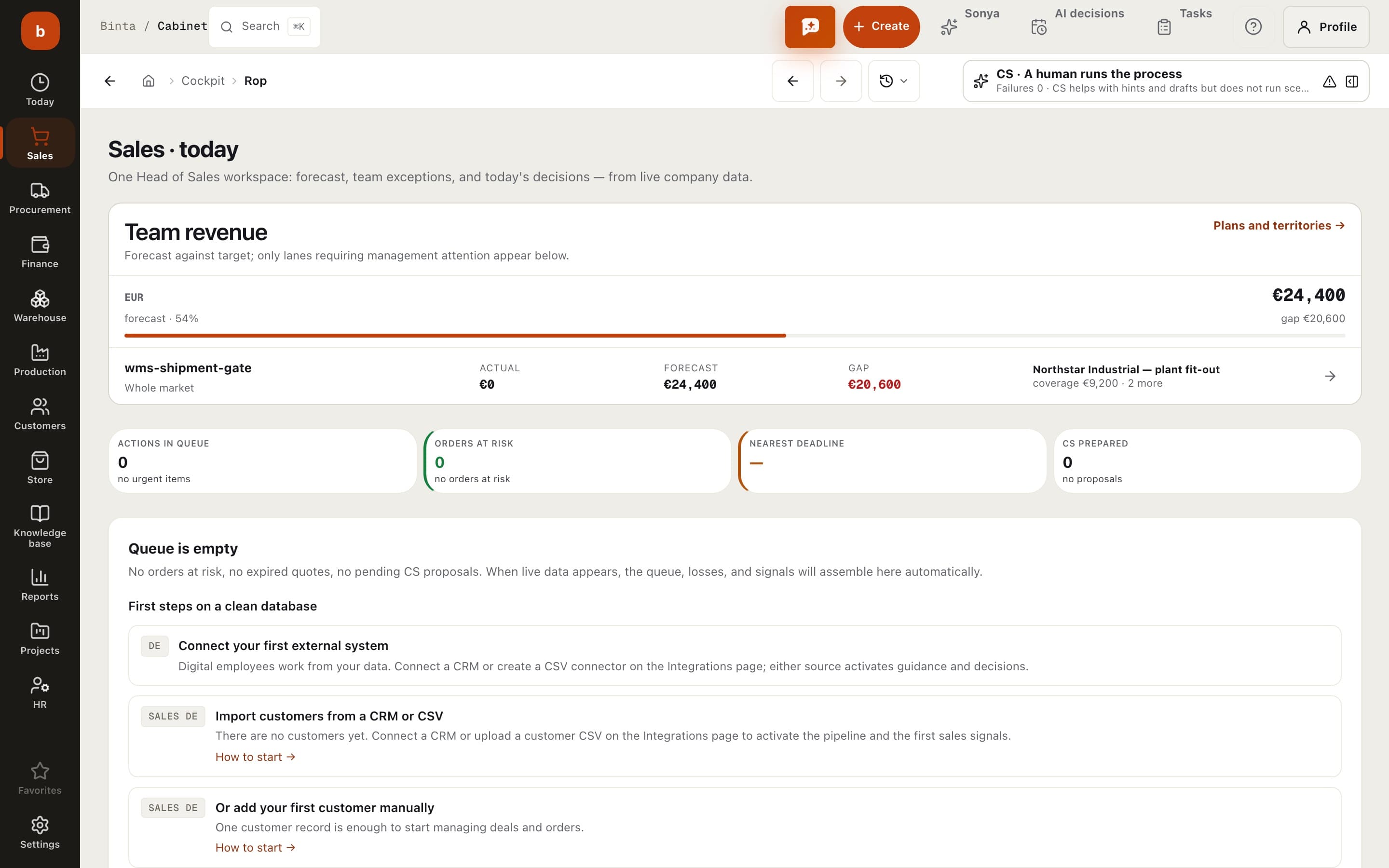
    The sales lead's screen: an action queue ranked by money at stake, each item paired with what happens if you skip it. Consequence figures are computed from data, never invented. The day starts with decisions, not reports.

    PRODUCT ROUTE/cockpit/rop
    01SignalA sales-lead command centre
    02Digital employee preparesadvances a deal when the data gives a reason to
    03Human decidesSends nothing to a customer without your approval
    Work map built from the implemented product route — not a stock image.
  2. 02

    A pipeline that moves itself

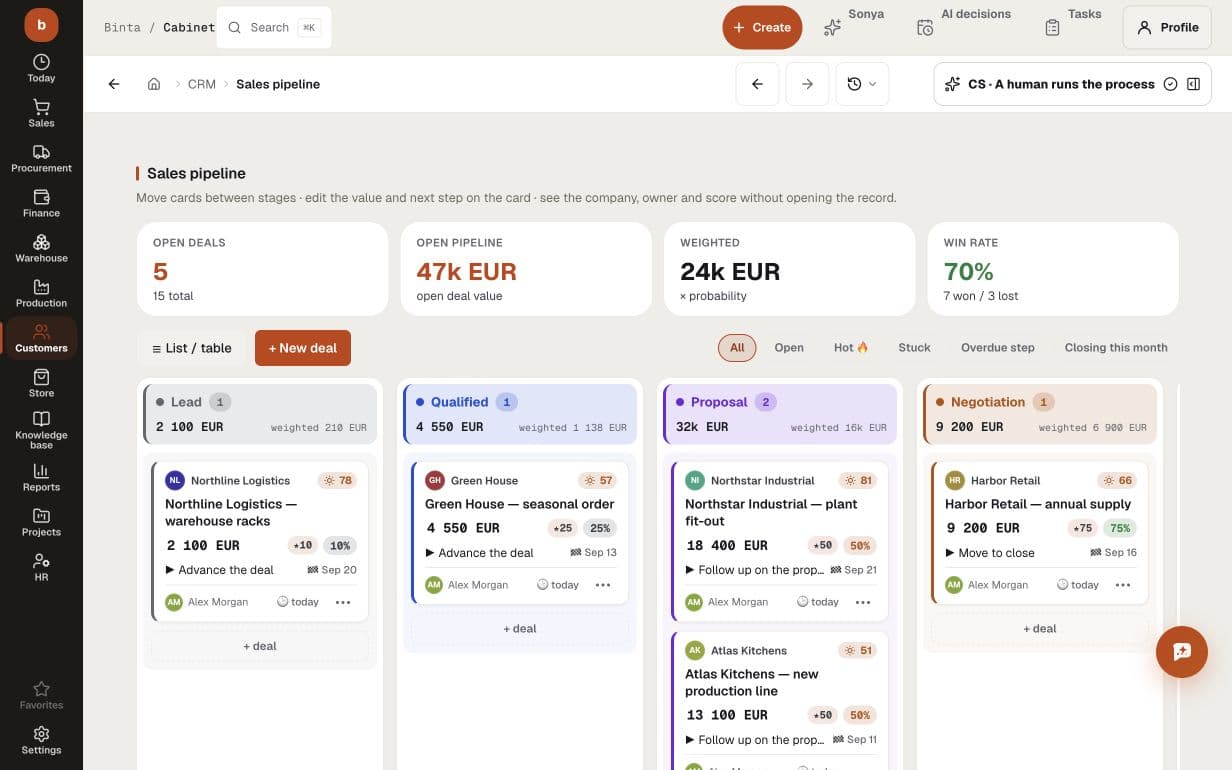
    Stages, amounts and dates on one board. The digital seller moves the deal along, drafts the next step and brings it to you for approval — you decide instead of filling in cards.

    LIVE PRODUCT SCREEN/crm/pipeline
    Sales pipeline with 5 open and 6 total deals, EUR 47k open pipeline, EUR 24k weighted value, 100% win rate and stage-level next actions
    Sales pipeline with 5 open and 6 total deals, EUR 47k open pipeline, EUR 24k weighted value, 100% win rate and stage-level next actions
  3. 03

    A deal card with scenarios

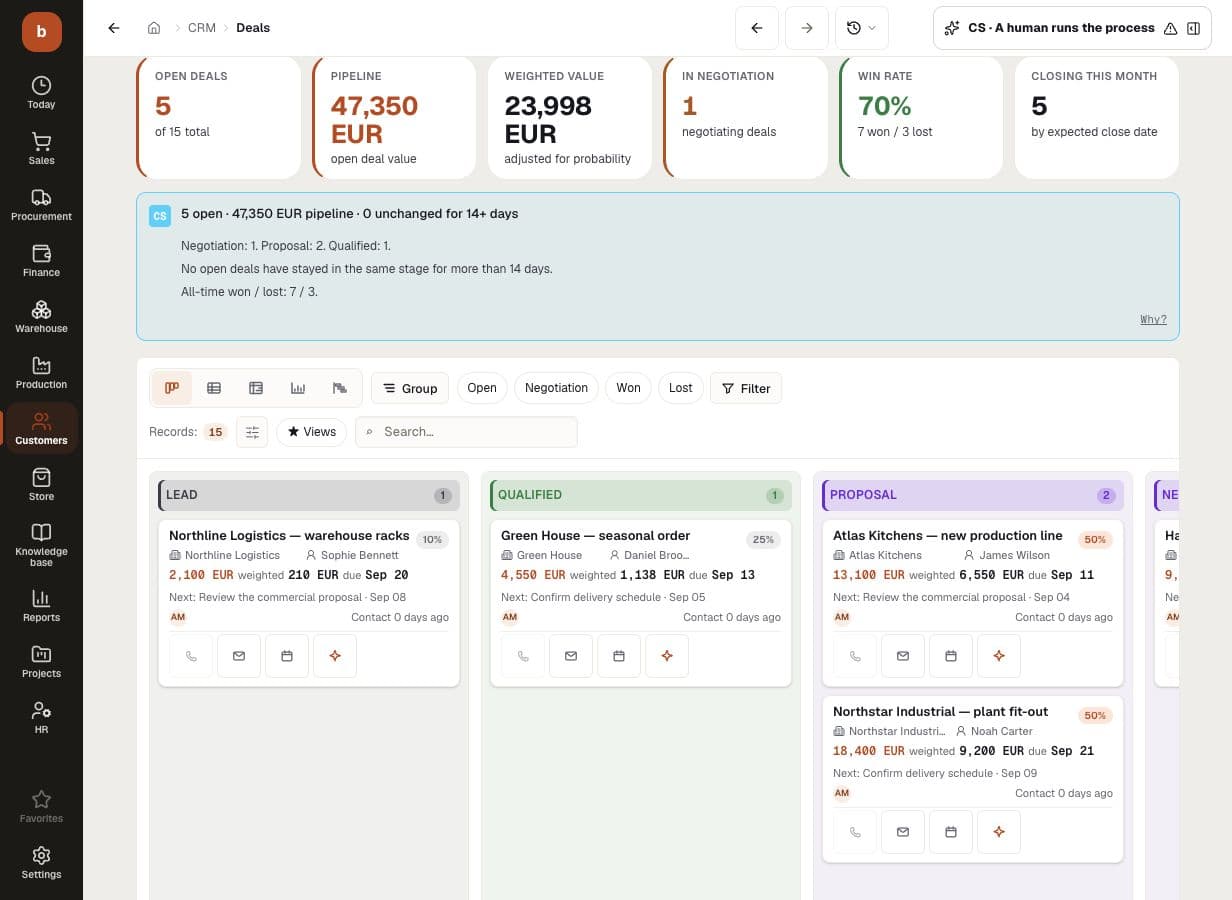
    Scoring, a stage playbook, quote scenarios and the whole correspondence in one place. An order is born from the card already linked — no re-entering the customer, prices or lines.

    PRODUCT ROUTE/crm/opportunities
    01SignalA deal card with scenarios
    02Digital employee preparesadvances a deal when the data gives a reason to
    03Human decidesSends nothing to a customer without your approval
    Work map built from the implemented product route — not a stock image.
  4. 04

    Touches on a schedule

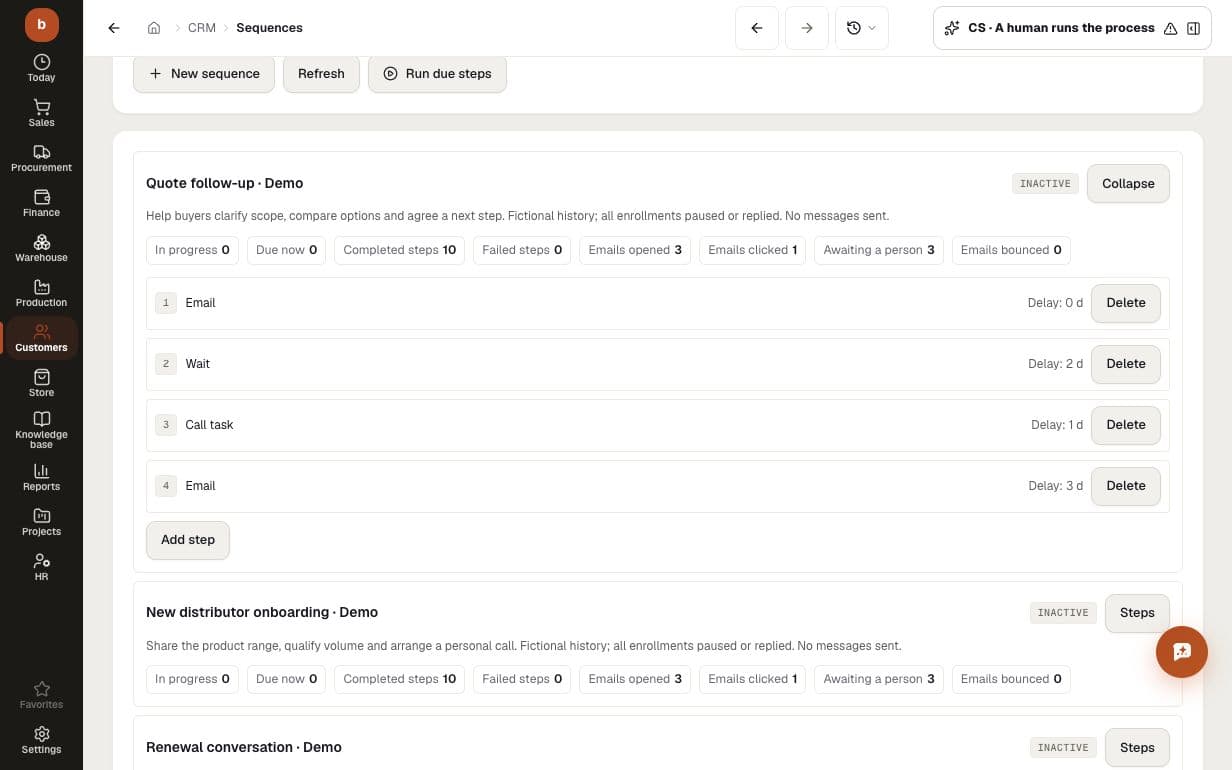
    Email and call sequences, activities with reminders, a history per contact. No lead is forgotten: open touches sit in their own list.

    PRODUCT ROUTE/crm/sequences
    01SignalTouches on a schedule
    02Digital employee preparescomputes plan vs fact per rep and finds who is behind
    03Human decidesProposes who to review today; the lead decides
    Work map built from the implemented product route — not a stock image.
  5. 05

    Plan vs fact per rep

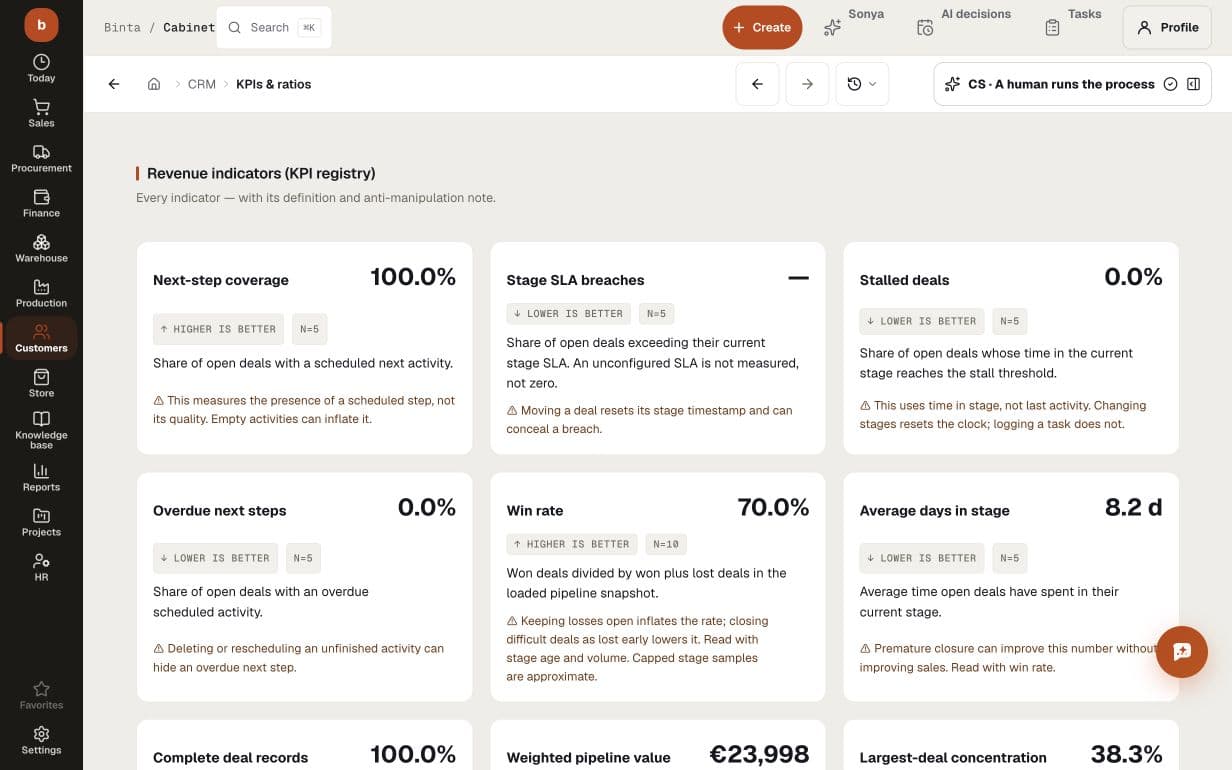
    Team KPIs: stage conversion, deal velocity, plan attainment. Not an average — you see who loses deals and at which stage.

    PRODUCT ROUTE/crm/kpis
    01SignalPlan vs fact per rep
    02Digital employee preparesadvances a deal when the data gives a reason to
    03Human decidesSends nothing to a customer without your approval
    Work map built from the implemented product route — not a stock image.
  6. 06

    Win/loss reviews

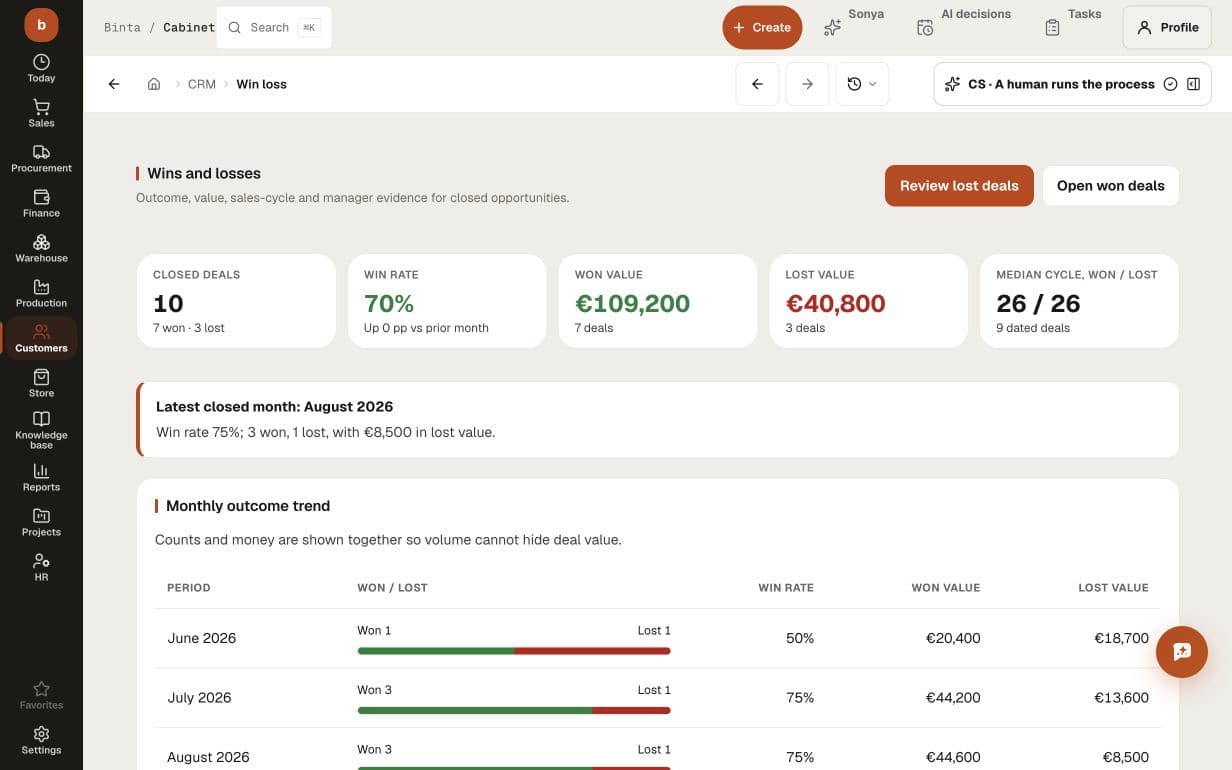
    Every closed deal lands in a review: reason, competitor, price. A month later it is statistics that show what to change in the offer.

    PRODUCT ROUTE/crm/win-loss
    01SignalWin/loss reviews
    02Digital employee preparescomputes plan vs fact per rep and finds who is behind
    03Human decidesProposes who to review today; the lead decides
    Work map built from the implemented product route — not a stock image.
  7. 07

    Stage flow without bottlenecks

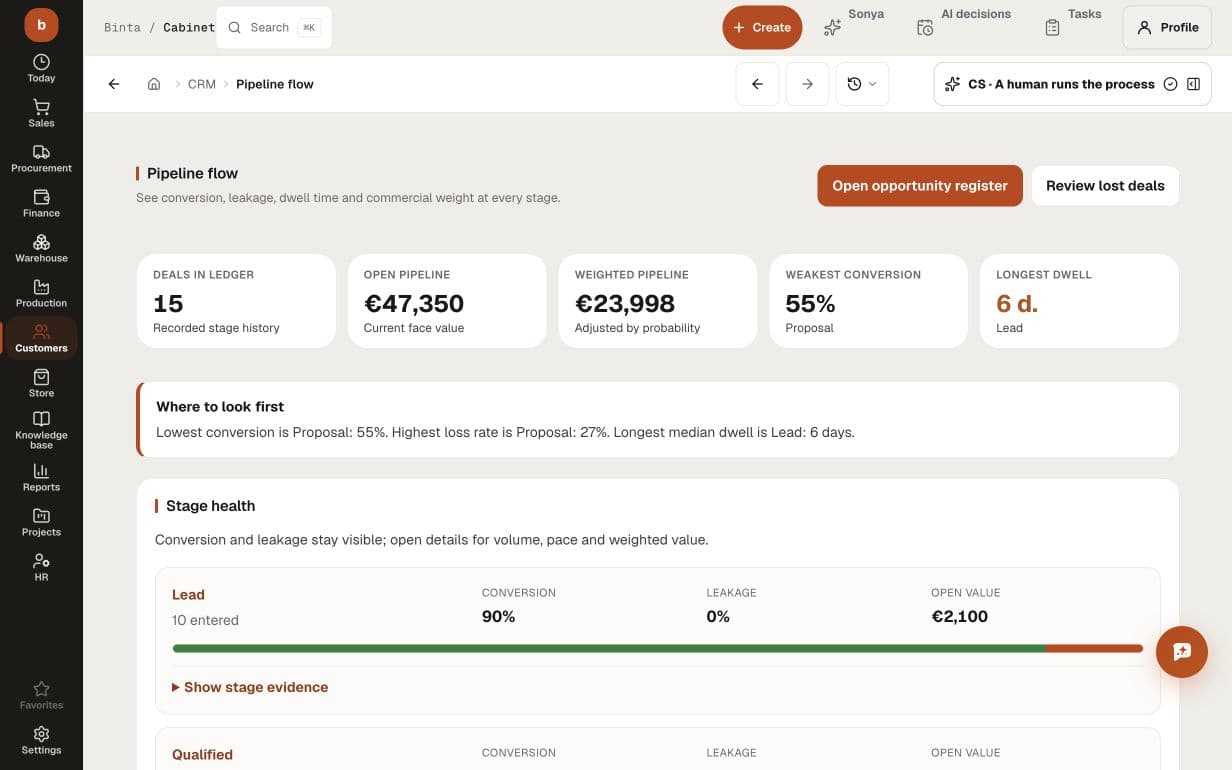
    The flow view shows where deals get stuck and how many days each stage costs. You see the bottleneck before the month drops.

    PRODUCT ROUTE/crm/pipeline-flow
    01SignalStage flow without bottlenecks
    02Digital employee preparesadvances a deal when the data gives a reason to
    03Human decidesSends nothing to a customer without your approval
    Work map built from the implemented product route — not a stock image.
  8. 08

    Sales control tower: what burns today

    Stalled deals, missed promises, plan gaps, and the reasons behind wins and losses. Win/loss review runs on data, not memory.

    PRODUCT ROUTE/cockpit/rop
    01SignalSales control tower: what burns today
    02Digital employee preparescomputes plan vs fact per rep and finds who is behind
    03Human decidesProposes who to review today; the lead decides
    Work map built from the implemented product route — not a stock image.
On screen

How it looks at work

Sales pipeline with 5 open and 6 total deals, EUR 47k open pipeline, EUR 24k weighted value, 100% win rate and stage-level next actions
Leads, deals, contacts, activities
BUYER QUESTIONS

What teams usually need to know before they start

Can we start with CRM without replacing everything at once?

Yes. Start with one workflow and the data it needs. Add adjacent modules only when the operating process calls for them.

What does AI do inside CRM?

Digital employees watch product records, prepare the next action, surface exceptions and keep the decision trail. Their exact actions and authority gates are shown on this page.

Which decisions stay with people?

Your team sets the authority. External messages, money and irreversible actions stay approval-gated until you deliberately expand the operating mode.

How quickly can we see a working flow?

You can review the target flow with realistic demo data on day one and connect real evidence during the first week. For a typical company of up to 50 people, four weeks is the target for moving one operating loop; source quality, integrations and legal requirements can change it.

START WITH ONE REAL PROCESS

Bring the workflow that costs your team the most attention

Map its data, decisions and approval gates first. Then see exactly what the module and its digital employees can take over — before you commit to a wider rollout.

Other modules