Module

Marketplaces

Marketplace integrations (listings, stock, orders)

Marketplace work without manual re-entry: cards, prices, stock and orders from Wildberries, Ozon, Amazon and Etsy live in the same catalogues as the rest of your trade. We have no direct marketplace API and do not promise one — instead a digital employee works inside the marketplace's own cabinet the way a person does, and every action is logged. You see which listing failed moderation and why. Only needed if you sell through marketplaces.

Business outcome
Marketplace integrations (listings, stock, orders)
Digital employee
Works inside the marketplace's own cabinet the way a person does
Human control
We have no direct marketplace API — and we do not promise one
Verified product route
/integrations/marketplaces
Marketplaces
Listings
Listing publishedPrice from the price list
Stock
Stock pushedFree of reservations
Orders
Order pulledHanded to shipping
One product, one stock figureA marketplace order behaves like any other
DIGITAL EMPLOYEES · LAUNCH

Digital employees run the work — AI is not a side panel

They read the same documents as your team, prepare the next action, surface exceptions and keep the decision trail inside the process.

You set the authority. Payments, goods receipts and shipments always wait for a person. Everything else, customer messages included, starts as a suggestion and runs on its own only once you allow it and verified results back it.
  1. DAY 1See the process working

    Choose an industry preset and start with realistic demo data; the team sees the target flow before migration.

  2. FIRST WEEKConnect real evidence

    Import or connect source data. Digital employees observe, draft and expose gaps while people confirm decisions.

  3. TARGET · 4 WEEKSMove the operating loop

    For a typical 50-person company, the target is four weeks. Source quality, integrations and legal requirements can change it.

Who does the work

The digital employees of this module

A module is more than screens. Digital employees work behind them: they prepare the decision and bring it to you instead of waiting for you to type everything in. Below — who exactly, what they do, and where their authority stops.

Marketplace manager

Works inside the marketplace's own cabinet the way a person does

  • updates cards, prices and stock on the connected marketplaces
  • pulls orders in without manual re-entry
  • shows which listing failed moderation and why

We have no direct marketplace API — and we do not promise one

WORK, NOT A FEATURE LIST

See what changes in the workflow — and where it lives in the product

Every capability below is tied to an implemented product route. A reviewed product screenshot is shown when it exists in this language; otherwise the route is explained as a transparent work loop, never as invented UI.

  1. 01

    Listings, stock and marketplace orders

    Connect marketplaces, publish listings, sync stock and pull orders into the cabinet's shared flow.

    PRODUCT SCREEN · DEMO DATA/integrations/marketplaces
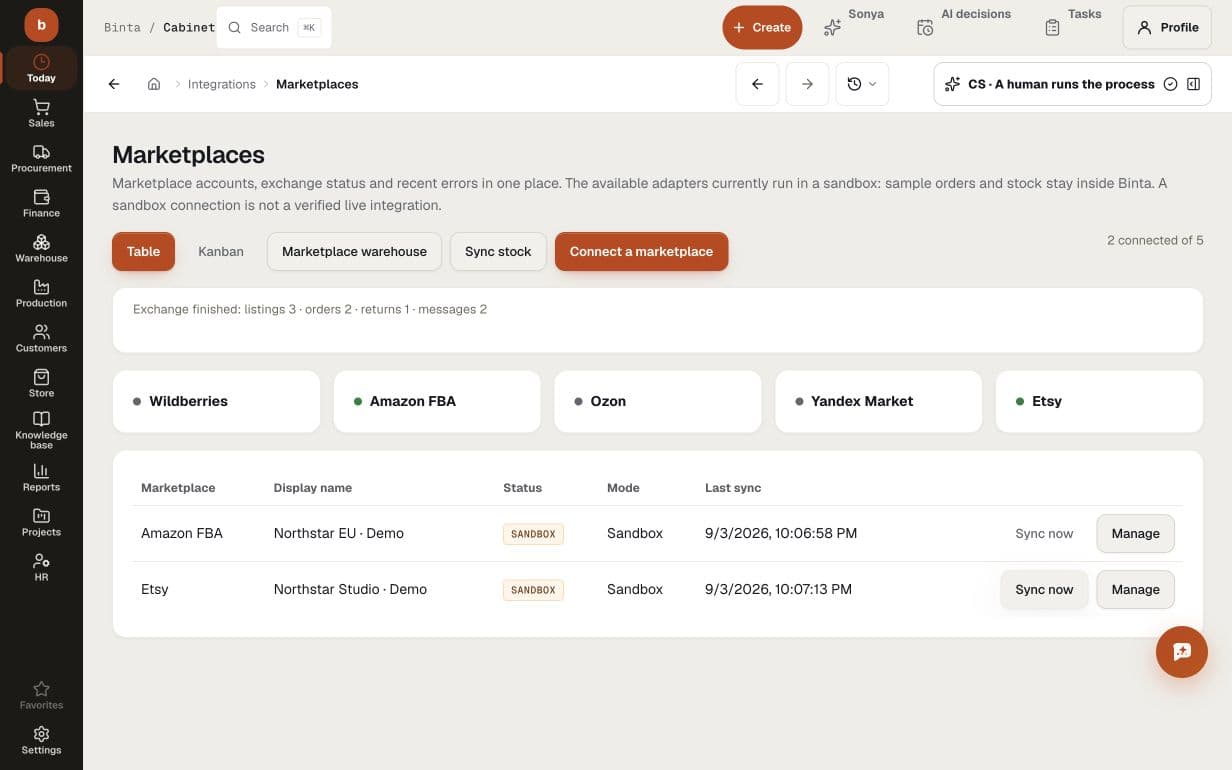
    Demo marketplace sandbox: Amazon and Etsy accounts, sync timestamps and a sample exchange of three listings, two orders, one return and two messages; not live connections
    Demo marketplace sandbox: Amazon and Etsy accounts, sync timestamps and a sample exchange of three listings, two orders, one return and two messages; not live connections
  2. 02

    Fulfilled-by-marketplace (FBO)

    A separate loop for goods held at the marketplace warehouse: its own stock, supplies and cost.

    PRODUCT ROUTE/integrations/fbo
    01SignalFulfilled-by-marketplace (FBO)
    02Digital employee preparesupdates cards, prices and stock on the connected marketplaces
    03Human decidesWe have no direct marketplace API — and we do not promise one
    Work map built from the implemented product route — not a stock image.
  3. 03

    A per-marketplace card

    Per connected marketplace — products, stock, orders and listing errors in one place. You see which card failed moderation and why.

    PRODUCT SCREEN · DEMO DATA/integrations/marketplaces
    Demo marketplace sandbox: Amazon and Etsy accounts, sync timestamps and a sample exchange of three listings, two orders, one return and two messages; not live connections
    Demo marketplace sandbox: Amazon and Etsy accounts, sync timestamps and a sample exchange of three listings, two orders, one return and two messages; not live connections
  4. 04

    The digital employee works inside the marketplace cabinet like a person

    Marketplaces did not give us a direct API — and we do not hide it. The digital employee works inside the marketplace's own cabinet the way a person does: cards, stock, prices, orders. Every action is logged.

    PRODUCT SCREEN · DEMO DATA/integrations/marketplaces
    Demo marketplace sandbox: Amazon and Etsy accounts, sync timestamps and a sample exchange of three listings, two orders, one return and two messages; not live connections
    Demo marketplace sandbox: Amazon and Etsy accounts, sync timestamps and a sample exchange of three listings, two orders, one return and two messages; not live connections
On screen

How it looks at work

Demo marketplace sandbox: Amazon and Etsy accounts, sync timestamps and a sample exchange of three listings, two orders, one return and two messages; not live connections
BUYER QUESTIONS

What teams usually need to know before they start

Can we start with Marketplaces without replacing everything at once?

Yes. Start with one workflow and the data it needs. Add adjacent modules only when the operating process calls for them.

What does AI do inside Marketplaces?

Digital employees watch product records, prepare the next action, surface exceptions and keep the decision trail. Their exact actions and authority gates are shown on this page.

Which decisions stay with people?

Your team sets the authority. Payments, goods receipts and shipments always wait for a person's confirmation, at any trust level. Everything else, customer messages and ledger entries included, stays on suggestion or approval until you deliberately allow it to run on its own.

How quickly can we see a working flow?

Start by exploring the process with labelled demo data. A live rollout needs checked source data, connected systems and agreed approval rules. We scope those prerequisites with your team before agreeing a schedule; creating a workspace is not a completed implementation.

START WITH ONE REAL PROCESS

Bring the workflow that costs your team the most attention

Map its data, decisions and approval gates first. Then see exactly what the module and its digital employees can take over — before you commit to a wider rollout.

Other modules